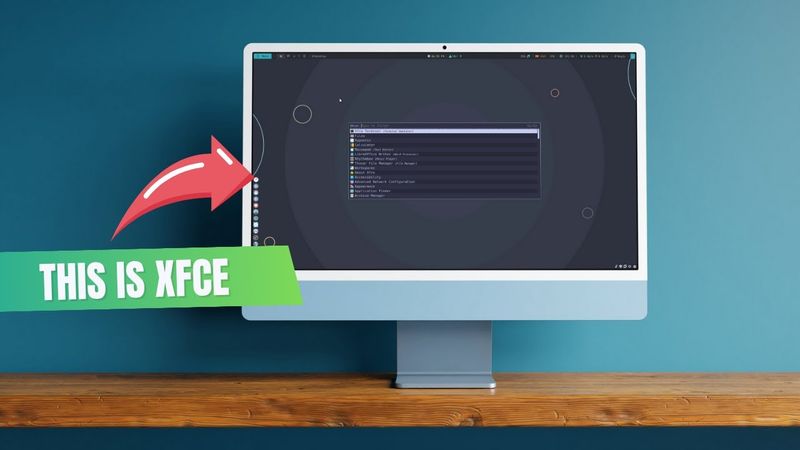
I Customized XFCE So Hard, It Looks Like Hyprland Now!

I Customized XFCE So Hard, It Looks Like Hyprland Now! Videosu İçin İndirme Bilgileri ve Detaylar
Yükleyen:
It's FOSS - Linux PortalYayınlanma Tarihi:
10.07.2025Görüntülenme:
781Açıklama:
Integrate ANY.RUN solutions into your company: Sign up for ANY.RUN for free by providing your business email: ___________________________________________________________________ Xfce is highly cutomizable. Don't believe me? You don't need to. Just see what we did in this video. This specific set of Xfce customization takes some time and effort but all the troubles are paid off when you see the final output. It's a thing of beauty.] Here's how you can achieve the same level of customization. *Download Customization Resources* 🌐 Nordic GTK Theme: 🎨 Zafiro Nord Icon Pack: 🖱️ Future Cursors: 🖼️ Nordic Wallpaper: 🔤 JetBrains Mono Font: Nerd Fonts: Suggested nerd fonts: CaskaydiaCove, FiraCode Nerd *Extract all downloaded files* - Create custom directories (if not present) - Move Files to appropriate locations GTK Theme → ~/.themes/ Icons & Cursor → ~/.local/share/icons/ Fonts → ~/.fonts/ Wallpaper → ~/Pictures/Wallpapers/ - Apply Theme & Icons via Appearance Settings If icons show cache error, run: $ gtk-update-icon-cache ~/.local/share/icons/Zafiro-Nord - Set JetBrains Mono as System Font - Set Cursor via Mouse & Touchpad Settings - Set Wallpaper _______________________________________________________ *Install Extra Tools (Polybar, Rofi, Plank)* $ sudo apt install polybar rofi plank Clean XFCE Panel Adjust Panel Position Right-click - Panel - Panel Preferences Move panel to bottom, enable auto-hide, set size to ~25px Make Panel Transparent Panel - Appearance - Style: Solid Color - Set transparency Remove Panel Shadow Open Window Manager Tweaks - Compositor Tab Uncheck “Show shadows under dock windows” Configure Polybar GitHub Repo: Clone repo and move config to ~/.config/ Edit config.ini to match display name (e.g., HDMI-1 or Virtual1) Use this command to get display name: xrandr Set update checker script (mintupdates.sh, etc.) -Set Rofi with Catppuccin Theme Rofi Theme Repo: Create config directory: mkdir -p ~/.config/rofi -Save catppuccin-default.rasi and selected theme (frappe) - Modify .rasi to use frappe - Create config.rasi with: @theme "catppuccin-default" - Test Rofi rofi -show drun Set Window Titlebar Transparency Window Manager Tweaks - Compositor - Adjust window decoration opacity Autostart Polybar & Plank Open Session and Startup - Application Autostart Add: Name: Polybar Command: polybar Name: Plank Command: plank - Set Rofi Shortcut Open Keyboard - Application Shortcuts Add: rofi -show drun -show-icons Set to Super + R - Configure Plank Ctrl + Right Click - Preferences Set: Theme: Transparent Position: Left, Alignment: Center Icon size, Zoom, IntelliHide Remove Whisker Menu (Optional) After Rofi is configured Create Workspaces Settings - Workspaces Set to 5+, rename to 1, 2, etc. XFCE Terminal Color Scheme Catppuccin XFCE Theme: Move theme to: mkdir -p ~/.local/share/xfce4/terminal/colorschemes Move downloaded files to /.local/share/xfce4/terminal/colorschemes/ Enable Application Menu on Desktop Right-click - Desktop Settings - Menu Enable: "Include applications menu on desktop right-click" Final Look Features 📅 Expandable clock 📦 Package update checker 🧠 System info via "Magic" button ⌨️ Rofi launcher 🖥️ Transparent panel and dock ……………………… 🧡 Follow It's FOSS for more Linux goodness: 🌐 Website: []( 📱 Follow us for more Linux content: 🐦 X (formerly Twitter): 📘 Facebook: 📸 Instagram: 💼 LinkedIn: ▶️ YouTube: 📣 Telegram: 🐘 Mastodon: 🌐 Bluesky:
Benzer Videolar: I Customized XFCE So Hard
I Turned This Broken Phone Into A Home Server

PROCREATE TUTORIAL 243 METAL ZEBRA

Creating a STUDIO LEVEL Commercial Look - Cinematography Breakdown

ASMR - 6 ROLE PLAYS IN 9 MINUTES! (Eye exam, sleep clinic, dentist...) (+ türkçe altyazı)
The PERFECT Mini Home Server