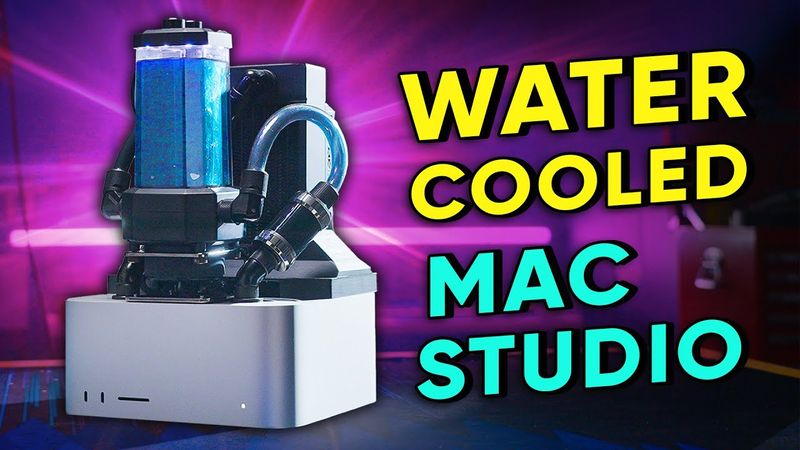
First Water Cooled Mac Studio
Download information and video details for First Water Cooled Mac Studio
Uploader:
Linus Tech TipsPublished at:
9/19/2022Views:
2.2MDescription:
Video Transcription
It's the drag race of the century.
On the left, we've got the Apple Mac Studio, and on the right, the Apple Mac Studio, but with a sick custom water cooling setup.
Like other modern chips, Apple silicon processors will dynamically scale their clock speeds depending on how much, or how little, cooling you throw at them.
So did Apple compromise on horsepower for looks again?
Or does the Mac Studio already unlock the full potential of their fastest SoCs?
Just how much performance can we squeeze out of Apple's M1 Max Max?
It's time to start the test while I start this segue to our sponsor, G-Core.
G-Core provides powerful public and private cloud services for content delivery, hosting, and security.
Learn more about G-Core and their new GraphCore IPU artificial intelligence cloud servers at the link down below.
Normally the problem that you run into when you try and water cool something that isn't supposed to be water cooled is simply space for all of your water cooling bits.
In the Mac Studio, that's actually not the issue.
Their heat sink assembly is just frigging massive.
We can very easily fit one of these alpha cool radiators in there.
Not a problem.
What is a problem though is Apple's random proprietary .
So as you can see, these fans right here have a little ribbon cable with six pins on it.
I don't know what those six pins do, but with any luck, as long as we can just disconnect these, then we can hook up our water cooling, everything will be cool.
It is very fortunate that we have two of the exact same Mac Studio.
We did that so that we could swap the SSDs and well, we didn't swap the SSDs because again, Apple proprietary bull .
But it does allow us to very easily, you know, drag race them later.
One fan lead.
Two fan leads.
This turns on, I will be very happy.
Oh, yay.
Okay.
It works fine.
We can just disconnect the fans and it does not care at all.
That's actually kind of concerning.
I thought that there would be a fan error that would come up and be like, your fans don't work.
Like literally every other computer that checks if your fans are working, but,
It doesn't do that, which is great for us, but also what the .
This is the main board for the Mac Studio.
And the primary thing that we have to be concerned about is cooling this Apple logo right here.
There are memory chips on either side of it, but those I'm a bit less concerned about.
They don't use excellent like thermal paste on it in the stock configuration.
I imagine it's fine.
The main reason we don't want to have a whole lot of stuff over top of these guys, because it's going to interfere with our radiator.
Our radiator is going to be in here, something like this.
Our fans that will be attached there.
And we will have several millimeters between these fans and these memory chips right here.
So our actual water cooling bit needs to go over top of it.
And then, you know, there'll just be a little bit of copper here.
It's gonna get nice and cool anyways.
It'll be totally fine.
Now, instead of just totally reinvent the wheel, we're going to be using this M.2 heat sink from Bear.
Well, we won't actually be using it.
This bottom bit is going to get just put in the trash, but this piece of acrylic will make our lives way easier.
And we don't have to worry about, you know, making our own acrylic piece.
Instead, this can attach to a piece of copper that we machined that will fit here.
mount to those holes, it goes over it something like that.
To make our lives even more easier, what we might do, this is extra dirty, this is our heat sink, and it already has the proper mounting holes and depth for everything in it.
Maybe we can just get rid of this, completely eliminate these fins, get rid of these heat pipes, face this off on the tarmoth, and then our lives are a lot easier, and we don't have to worry about, you know, custom making this piece that Apple already kindly made for us.
Or maybe we'll just completely screw this up and have to do the whole thing ourselves.
Here's plan number one.
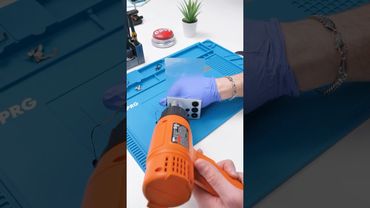
Take a heat gun, point it towards the heat sink, and hopefully we can just chisel off all of these fins.
Failing that, we have a backup plan.
We're gonna wait until it's around like 220, 250, something like that, and then we might actually be able to get this off.
I don't think this is gonna work, but if it does, that would be fantastic.
Yeah, I'm just mangling the fins.
Well, plan B.
We say this every time we cut aluminum, but I'm just gonna go over it again.
The dust is very bad to breathe in, so make sure you have a mask, a good old face shield in case something explodes.
No, you don't want that going in your face.
Also make sure that you have an aluminum cutting disc.
It has lubricating stuff in here to help prevent the gumming up and exploding, but not entirely.
Yeah, it just kind of sucks to do.
And definitely hearing protection.
This is pretty brutal.
The angle grinding was just making a mess, so instead we're just gonna simply get it off exactly like that.
I'm pretty sure Tynan just sharpened this chisel.
My sincerest apologies, Tim Cook.
Next thing we have to do, these copper heat pipes that are right here, they are very soldered down.
They are not coming off.
Instead, we're gonna go over to the Tormach and just face off this area right here so we're able to attach a water block to it.
There's almost definitely a better way to do this, but I'm a YouTuber, not a machinist, so this is what I've come up with.
We have this nice little plate from Saunders Machine Works that has a bunch of
clamp down to it.
This is going to go into our vice because there's not enough space anywhere for this just mount to our table.
And this is gonna be kind of scary.
Although it should be totally fine.
If the tool just decides to do anything that it shouldn't, it's going to hit something.
All right, I have checked and double checked everything.
I believe we are good to go.
As long as this doesn't decide to do something random.
Our part on the Tormach turned out great, although we've actually totally changed the plan.
Having everything internal was going to technically work.
In order to have these fans clear the water block that was going to be on here, it would have to be smaller than the one that I put in the red camera.
I was just very concerned that it would not cool as well as the excellent solution that Apple has from the factory.
So we have completely redone our plan.
This is what's going to happen.
See this wonderful Corsair block right here?
Bam!
Turns out thread ripper mounting holes almost line up perfectly with the ones that Apple has from the factory.
So that's CPU taken care of.
Now you might be thinking with this big old CPU block, where's all of your stuff gonna go?
Right on the top.
Radiator, pump, amazing.
It is going to be, without a doubt, the coolest Mac studio in existence.
Now, one of our biggest problems was RGB and fans.
12 volts we can very easily get from right here off the power supply.
All other voltages, not so simple.
Now, it is very crucial on something like this to have just a bunch of RGB because I wanna just annoy Apple people as much as possible,
which means loads of RGB.
And that is quite difficult.
So we went with Corsair stuff because they are the only ones that have RGB software for Mac OS.
This controller is going to work really, really well because I'm able to have it in hardware mode.
So it just runs all of our RGB off of it.
And we have a temperature probe in our loop that goes into our controller here that controls our fan and pump speeds.
So we don't have to worry about, you know, grabbing it off of
and then hopefully everything just works really, really well.
One more thing though, this is gonna be pretty stupid.
For five volts, we will be using this buck converter.
12 volts in right here, adjust this potentiometer until five volts comes out of there.
We are happy.
Yeah, I guess at this point we have not many hours to get this done.
Let's do it.
There we go.
There's your cold plate.
And now we're left with this, which will hold our main board to, well, it'll just hold it.
Getting this thing in here was not very simple.
We are about two and a half millimeters away from the full travel of the Y-axis of this machine.
It's really close, but we should be able to do it.
Look at that.
So precise.
Everything's roughly in place at the moment, including our nice tubes so that the main board can go in and out.
What we don't have though is power going to our RGB and fan controller.
We know that we're going to be getting it off of the power supply right here.
We do not know which way this voltage goes.
Fortunately, Apple doesn't tell us the polarity of this power supply.
So I have attached some leads.
Now it's either going to just say,
plus 12 volts or minus 12 volts on here.
And then we know which way to wire all of our stuff.
Yeah, don't do this at home.
Please just don't.
So not only does this tell us that we have minus 12 volts right now, also lets us know that we have 12 volts always on.
A lot of power supplies, you need to like press the power button on the motherboard before it starts giving you 12 volts.
This one just gives it to you right away for some reason.
Oh wait, it's dropping.
Maybe that was just, it gave 12 volts while it was charging.
I don't know, it doesn't matter.
That is good to know though, because I was kind of concerned about the Mac being off and our fans and pumps still just running indefinitely.
Getting everything to fit in this Mac studio has been quite a challenge.
By getting everything to fit inside of it, I mean on top.
Even our Corsair controller, it would not fit inside.
It technically could, it was going to be
Very difficult.
So instead we have denuded it.
It's going on the top.
We've redone our radiator mount.
It's this nice black 3D printed piece now that has space for our RGB hub down below.
Because the spirit of this is really, you know, PC-ifying the Mac Pro, I have used Wago lever nuts to add expandability to this loop in the future.
And as you can see, our buck converter's right down in there.
Attach it to a power supply, it now spits out five volts.
One more thing, if you look really closely, in here we have two 40 millimeter Noctua fans and the rest of the hole's all blocked off.
This is for the power supply actually, so it draws air in from the bottom, shoots it out the back, and hopefully your power supply does not overheat.
Probably be fine without it, but this is just some good insurance.
I've added a little bit of VHB tape to the bottom of the pump.
This isn't to hold it down.
The screws are gonna do that just fine.
It's to try and stop vibrations going from the pump onto this top plate here and just turning into a little drum.
One thing I feel is underutilized in PC making is hot glue.
We have a connector right here for our Noctua fans that just keeps on wanting to come off.
It's gonna stay on now.
As you can see, Corsair clearly knows this.
They have a bunch of hot glue on here from the factory for string relief.
Here's the power for our fan hub and RGB controller.
Just simply probed it while it was connected into one of these, figured out what's five volt ground.
You get it.
It needs to go in, which means this Molex connector needs to leave.
Getting a radiator mount on with the Corsair controller underneath it is not very simple.
We've pulled all of the excess wires up through the top so we can hopefully get it down.
We'll get it bolted on and then we can stuff all of this back down in and hopefully it'll be fine.
There we go.
We've got our little fan shroud piece that just printing this easier and way faster.
On the inside, we're using Alpha Cool's server-grade fittings and tubing.
It's just way better at not coming out.
And we really, given how much this is gonna be stuffed inside, do not want a tube popping off.
The tubing runs for this are a bit on the unfortunate side.
If we were smart, we would have taken our time and planned it out so that this hole was directly underneath this, and you could just have a little tube there or a little run.
We didn't do that, because we were rushing.
Instead, we have a run that goes like that, another one that goes back and around, and the most biggest dumbest of all, look at how close these are.
There's no way to get a tube in here.
So the solution, the big old loop-de-loop, it's kind of gross, I don't love it, but at the same time, it's gonna be able to show off our nice fire orange.
Well, this is why you leak test.
I figured it was fine.
But if we have a look at the needle, it's dropping quite rapidly.
I really hope that the leak is somewhere up here because if it's on the inside, putting in a bunch of the IO down here, huge pain in the arse.
And it looks like I might need to do it all over again.
Found where it's leaking.
Seems like it's the other side of this right here.
The through holes are honestly pretty trash.
So I'm not super surprised.
You do things out of order for filming sake.
Blaming this on you, Brandon.
For the record, it's not my
So I'm going to use the good old soapy water trick.
I think this might be our spot.
I just have soap water all over the place.
Problem is just this connection right here.
Look at that, not moving at all.
Leak tested, working great.
Gotta stitch it all back together and we should be good to go.
We're doing it smarter this time.
I want to make sure that everything up here works before we stitch it all back together, and I have to take it all back apart again, because that would just be terrible.
We have Mr. Nick Heavy.
He's going to fill it up.
I have a bench power supply that's going to the leads that will be attached to the Mac Studio's power supply, and this is going to be beautiful.
This is not sketchy at all.
Nope.
Kind of scared.
How did that happen?
The tube screwed us.
Oh, no.
We're professionals here.
We spilled water before.
Oh, that looks good.
That RGB is working.
This RGB is working.
Pump's working.
Fan's running.
How are these fans?
We have RGB internally.
This is dumb in all the right ways.
Thank you.
That's what I was going for.
Let's stitch it back together.
I think we've done it.
She's absolutely stogged.
Like you can see right here, that doesn't want to go all the way in because the power leads.
The whole thing just kind of was like, get it back.
But it's so stupid.
I absolutely love it.
I really hope it works.
I really don't want to take this thing apart again, but it's kind of looking like I might.
It's below 60 degrees and it's very similar to the air cooled version.
which is not what I was hoping for, but I was just kind of like, ah, maybe they have a bad IHS spreader or something like that.
And that's the bottleneck.
But no, we put the dye in there and it just very slowly meanders way through.
There's definitely a kink in there.
So now I get to just spend the next hour taking it apart and reassembling it.
The benefit of this is that the fire orange looks more like Tang.
So I think we're just gonna get rid of that.
Otherwise, hopefully it all works.
45 minutes later, whole thing's been disassembled and reassembled.
That might be a record.
I don't know if anyone's ever done it that fast before.
For the coolant, we're going to go with the GoChiller PreMix.
It has a bunch of carbon particles in it.
Apparently it reduces your temps a bit.
Mostly it just looks really fricking cool.
So we're gonna use that instead of the Tang juice.
Oh, there we go.
Looks fricking sick.
Let's start here, Cinebench.
We're looking for it to be under 60 degrees.
That's about as hot as the other one gets.
Looking at 55, 54.
Yeah, the hottest that I'm seeing is 55 degrees.
Seems like we're not getting as good of cooling performance as I would have liked.
Kind of like I guess before, it probably has to do with Apple's IHS, just not being able to get the heat away fast enough.
But at the same time, this thing's really well cooled.
So glad I bought two of these.
Yeah.
Otherwise, how would we do an apples to apples comparison?
You guys did a surprisingly professional job of this.
Is this our new standard of quality now?
I guess so.
There's a whole Corsair RGB and fan hub in here that's controlling everything based off of like the temperature of the water.
Hello?
Okay, we're good.
Yeah, sorry.
Holy crap, we dropped the temps by 30 degrees.
Not only is it 30 degrees lower, but this fan is barely spinning.
I mean, I guess that's what happens when you put a giant water cooling radiator on like, how many Watts is this chip even?
Like 45 Watts?
and it's near silent.
Okay, here we go.
Let's go.
Let's go water-cooled mech.
Come on.
I don't want it to do better.
That's fair.
12.056.
12.016.
40 points.
Did we think there was gonna be a performance uplift?
I mean, it's not exactly a MacBook Air.
It's not known to thermal throttle, right?
Apparently the M1's turbo boost is really terrible.
But also it doesn't matter because they sip power and are well-cooled.
We did a thing.
You have to admit.
It looks great.
No one else has a Mac Studio that looks like this.
This is hot rotted out.
I love it.
It's 20 degrees cooler and it looks like that.
I think we can call it a win.
Here we go.
12,104.
I got another 48 points.
12,028.
So both times the water cooled one was technically faster.
The best kind of faster.
Just like this is the best segue to our sponsor.
MANSCAPED.
Thanks to MANSCAPED for sponsoring today's video.
MANSCAPED's ultra premium collection is an all-in-one skin and hair care kit designed to keep the everyday man covered from head to toe.
There's the two-in-one shampoo and conditioner, their body wash infused with aloe vera, hydrating body spray, deodorant, and a free gift, moisturizing lip balm.
Simplify your man maintenance with MANSCAPED and best of all, all of their products in the ultra premium collection are cruelty free, paraben free and vegan.
Visit manscaped.com slash tech or click the link down below for 20% off and free shipping.
If you guys enjoyed this video, you might also enjoy the one where we water cooled a red camera.
That was less pointless.
Similar videos: First Water Cooled Mac Studio

I Did a Terrible Job of This - Intel $5,000 Extreme Tech Upgrade
The Worst Product We’ve Tried in YEARS! - Bykski External Cooler

The ONLY M4 Mac mini accessory you need - 6 docks tested!

Flying Inside A CARDBOARD airplane (Manned flight!)
The $10,000 Mac Pro Killer