WD Black SN770 PS5 SSD Test - Will It Work?
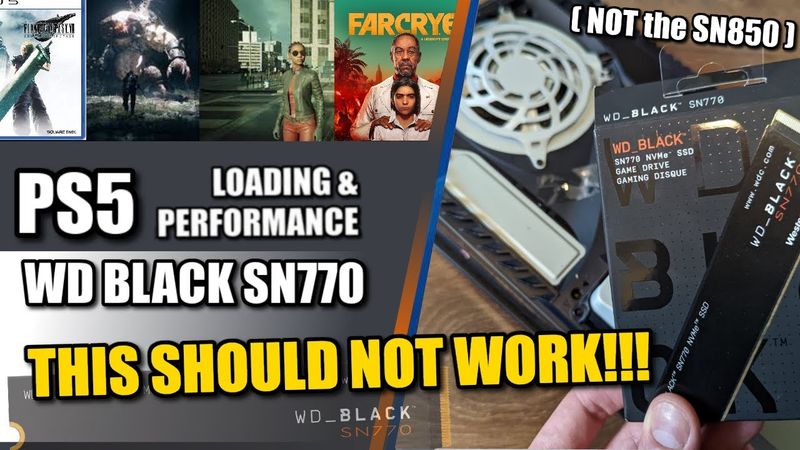
Download information and video details for WD Black SN770 PS5 SSD Test - Will It Work?
Uploader:
NASComparesPublished at:
4/26/2022Views:
57.8KVideo Transcription
Hello and welcome back.
And that is right.
Today we are revisiting the subject of SSD upgrades for PS5.
But today we're looking at something a little bit different.
We're looking at a WD Black SSD.
That's not new.
We've done that a few times before.
But today we're looking at the more cost effective value series WD Black SN770s released.
Right at the start of 2022 and unlike the previous really released WD Black SN850 back from 2020 this SSD has a lot of architectural differences about it in the way that it's built which is ultimately reflected on the performance it gives and its price tag.
Now a few disclaimers straight off the bat.
During the course of this video, I am going to be testing four games that we've tested before, and we're going to be running on my PS5 here.
But what I will say is this SSD does not arrive with any option of a first-party heatsink.
This SSD doesn't arrive with a heatsink, so I've had to use a third-party one.
I'm using the Ella Teng.
But in the images you'll see on screen, just so you can see the SSD, I've removed the plates and you can see the drive there.
But just know that during these tests, there was a heatsink.
It was a $10 Elaten heatsink.
The metal plate was covering the SSD and the PS5 side panels were on the sides of this console at all times.
The only other disclaimer to talk about is...
I've got a bit of a cold so I apologize if I sound a bit nasally or if occasionally you hear me sneeze because we are all human and we all get colds.
So let's go ahead and format this SSD because I think this is going to be giving us our first early doors idea about why WD do not recommend this SSD for PS5 storage.
So let's have a little look and see what the PS5's own internal benchmark is and it has rated it
at you know a relatively lowly 5206.93 megabytes per second and what i'm going to do is make my way into the storage manager transfer some games and then i'm going to talk to you guys a little bit about this ssd which once again wd do not themselves do not recommend for usage on a ps5 storage upgrade they recommend the sn850
But I'm going to talk a little bit more throughout about why they don't recommend it for this process.
If we go to the storage manager, scroll on down, go into the M2, and there you can see the SN7700-1TB.
Ignore that update for Elden Ring.
That's going to be all of those updates you can see that are all happening to the internal PS5 SSD, and I'll make sure they're completed before we do any of the testing.
But as you can see there,
No games on there right now, and it's a one terabyte drive.
So let's go into the games and start transferring our four games over.
These comprise of Far Cry 6, the Matrix Unreal Tech demo, Demon's Souls, and Final Fantasy VII.
We will have a new series coming soon, which will of course feature Elden Ring, Gran Turismo, among some other fun games.
I'm gonna think hopefully we can get Dying Light in there as well.
But let's go ahead and transfer some games over.
So we're going to be taking our games that we've used for our other tests, those four there, it's 255 gigabytes.
Let's move those over to the SSD.
And I'm going to talk to you guys a little bit about the makeup of this SSD and why it's not recommended, but nonetheless, we are going to test it.
The SN7700, the reason it's different to most SSDs, particularly the WD Black SN850 is to do with something known as DRAM or to be more precise, the lack of it on this SSD.
SSDs are kind of built like a computer.
When you see a lot of the PCs that you use and buy in the market, some of which have got CPUs and GPUs listed and memory and stuff like that, SSDs are quite the same.
An SSD has a little brain called a controller.
That's kind of the CPU.
It's got tiny little areas of storage.
You know, there's NAND.
That's where your data lives.
But there's also generally an area of memory, much like the RAM on your computer.
Now, the WD Black SN7700 does not feature any RAM.
It has no onboard memory, and it takes advantage of something called HMB, host memory buffer.
It makes a request to the operating system to use an area of storage, a small 64 megabyte area, to use as caching space.
on behalf of the SSD and therefore the SSD is more simplified, it generates less heat because there are less components to hand and it gets to be a little bit more affordable.
The trade-off of course is twofold.
Number one, performance isn't as high.
This SSD has a rated performance threshold from WD
at just over 5,000 megs, 5,150.
And in our earlier testing in a previous video, I think we hit 52 or even 5,300, but that was on a Windows test machine.
Why is that important?
That's because this SSD doesn't seem to ask, or at least isn't able to ask the PS5 for a little bit of that caching space in the same way.
And the result is,
that this SSD may, during our testing, hit a bottleneck where it runs out of computational room to process what we are doing.
Now, we've moved games on this system before many, many times.
It normally is quicker than this for just 255.
And I think this is an example of what you're going to be seeing.
This SSD is comparable a lot more to some of the Phison E16 SSDs that we talked about in the past, such as the Sobrent Rocket PCIe 4, the FireCuda 520 from Seagate.
SSDs like that one on the Crucial P5.
This SSD is one that I personally would not recommend.
for a premium PS5 upgrade.
And once again, WD themselves do not recommend this, but we're testing it for two reasons.
One, because a lot of people are seeing how cheap this is and making mistakes and buying the wrong SSD maybe
For their family members PS5, I'm not sure, or for themselves.
They've seen the words WD Black, they've heard WD Black and PS5 and Mark Cerny, and then they've just purchased it, not realising that they have bought the value series drive.
And as you can see there from on screen, we did transfer that data, but it did take a wee old while to do that.
And certainly in our previous tests, it was quicker than this.
So in today's video, I am going to be testing those four games.
We're going to be going through and we've got a few preset scenarios that we're going to be testing there.
And each one of them, we're going to be looking at them side by side, alongside their performance on the internal PS5 SSD.
We're going to be doing two tests of the matrix,
Two very brief tests of Far Cry 6.
We're going to be doing one test of Final Fantasy 7.
And two, kind of 2.5 tests there for Demon's Souls.
So what we're going to do is make our way into our first test game, which is Far Cry 6.
We're going to make our way in.
And what we're going to do is load from the title screen into the game.
So let's fast forward to the title screen and begin our tests.
Right, so here we are at the title screen.
So let's go straight ahead and load into the game.
We're going to a checkpoint.
We're going to go from here in three, two, one, go.
Shouldn't be very long.
This game has quite quick loading screens.
We've got them side by side.
It already feels quite similar.
I felt that felt a little bit longer than what we've seen before.
But again, the first thing we want to do is just quickly make our way into another area of the game and just start driving along, seeing if we can push this game much.
Again, for those that are wondering when we do these tests, we're looking for the following things.
We're looking for bad texture swap.
We're looking for sometimes drops in frame rate, but that's not as prevalent as you might think.
What we're mainly looking for is when the game has difficulty loading assets in and out.
So when things are far away, games tend to use low texture assets.
And as you get closer, the game has to swap them out often for those other higher resolution assets all the way through.
This is quite common.
And again, it's a way that the game can make sure that it's not kind of
being inefficient with the amount of memory space accorded to the system and the GPU, of course.
Now, as we run through these tests here, it's that swapping where I think the SSD may have difficulty.
A lot of people, when they think about modern gaming, they make a classic misconception where they think the entire game is loaded in RAM.
There's a loading screen, it's loaded in, and everything is just being pulled from RAM or memory, and that's simply not the case.
With most games these days, particularly open world games, they use techniques such as silent loading when a character is held in a certain position or viewpoint or speed so it can load in assets.
Or if a game is open world and it doesn't have loading barriers, so it has to find creative ways to pull new data from assets, the PS5 generation...
utilizes quite super fast SSD storage with the internal PS5 SSD measuring a read speed of 5,500.
The result is that the SSD has to supply all of those assets as quickly as it can to the PS5's GPU, CPU and memory as it requires them on the fly.
And this SSD being RAM-less,
and being a lot more reliant on the rest of the system kind of taking the weight of everything that's going on.
I think it's going to be interesting to see.
I don't think it's going to be Far Cry that shows us this.
Because Far Cry, say what you will about being a PS5 game.
It's also a PS4 joint release.
And I would still consider it kind of a half PS5 game overall.
But we're testing it because it is quite a useful game to test silent loading there.
But for now, let's go ahead and make our way back to that checkpoint as quick as we can.
Because what we want to do now is see how long it takes.
3, 2, 1.
So now we're loading back to the same checkpoint that the games had to reload those assets back in.
Again, it does feel slower.
Not hugely slow, and maybe there in post, when we go through the comparison, because I can't see how quickly this is loading on the internal PS5 SSD.
I can only go by memory.
I remember it feeling a little quicker than that.
I'm not seeing any difficulties vis-a-vis the actual game itself and how that's playing.
But I will say that it didn't feel as snappy as it might have before, particularly when we've bench tested other SSDs on this system here.
But for now, we'll just carry on moving along.
And I think for the most part, what we're seeing here is kind of what I would have expected.
It's not going to be a game that's going to challenge things too much.
I will say this is a game that if you stop looking at the immediate road and look into the distance there as I drive, and I'll kind of move the camera up a little bit for you guys, you can see a lot of that texture pop there in the distance as certain things get pulled in.
But I would also say how much of that was present prior to the PS5, you know, when it was on the inside SSD, the internal SSD.
We can't really say, but look at the distance there and you'll start to see objects popping in one by one, often trees, but also lighting effects and more just kind of appearing there.
This is enough for this test.
Let's move on to our next game, a great little test series game utilizing that Unreal 5 engine, the Matrix test series.
Let's go straight into that now.
Right, so here we are on the Matrix Awakens Unreal 5 tech demo.
Lovely stuff here.
And again, we've got two tests for this game.
And this is going to be a lovely test to see just how well this SSD can play games.
So without further ado, let's go in in three, two, one, go.
So the first test is going to be driving in this open world here.
Again, this is going to be a silent loading world.
That loading felt pretty good.
It felt pretty on the nose for me there.
We'll make our way through.
Again, the first thing we're going to do is go straight into driving.
So again, I'm going to try and remember the controls very quickly, grab ourselves a car.
Let's go for this bad boy here.
And again, the second test will be on foot and flight.
Again, this is one of those tech demos that I just love to pieces.
Notwithstanding, it gives you a great understanding of what Unreal 5 is going to be offering us as we see more and more developers tinkering with it.
But on top of that, just the sheer scale of this technical demo is just incredible.
Don't worry too much about drops in frame rate there.
Again,
that happened particularly when I was doing that kind of hit on the PS5 internal SSD this is still a tech demo the other thing I will add while I'm doing this is this game or at least this technical demo here is built around the idea of not just silent loading but the way the game loads textures at any one time taking advantage of this new triangle system and if you
Do own a PS5 system.
I do recommend going into the demo area and just downloading it there because there's loads of ways you can tinker with the settings to allow you to see what a lot of this is able to do.
Switching off certain settings and lighting effects.
textures but for now I think right now we're seeing it run pretty well I'm not seeing any problems and I don't know how to drive so what we'll do is I think that's good enough for me let's make our way back onto the main desktop there so let's go back head back into the main menu and what we're gonna do is exactly the same thing but this time no vehicles needed so let's go in loading in in three two one
Again, maybe that felt a little slower.
You guys are the ones that are watching both of these side by side.
I can only see the PS5 recordings.
I'm sure you'll be able to tell for yourselves how that's going.
But for now, let's go straight into flight mode and pick up some pace, shall we?
So the idea is we just want to make sure this game doesn't crash, that we don't see any issues.
Again, we've got the crazy lighting that's always happened while we're going into the sunlight there.
But yeah, for the most part, that feels pretty normal.
Let's start making our way around as quick as we can.
And again, all pretty straightforward stuff there, all the way along, moving along nice and quick, not seeing any problems.
I will say I wish the PS5 featured a measure of the temperature of an SSD, because even with the Elaten heatsink I've installed inside, and once again, I mentioned it in the intro, but I'll say it again, I'm using the Elaten heatsink.
I have replaced all M2 and PS5 covers.
It is completely covered up as normal.
But I imagine this SSD is getting particularly hot inside this system.
In hindsight, perhaps I should have done some temp testing, but the setup for those videos is huge and I know this is quite a niche little video.
Perhaps if this is quite popular or we see more and more about this SSD perhaps doing well, then maybe we'll look into options.
I am kind of feeling like we're getting a little bit more drops in frame rate than what I've seen before, but not a huge amount there.
But seriously, the sheer scope of this demo is just phenomenal, really, once you really get down into it.
But for now, yep, I think we can move along and have a little look there.
I think for the most part, I'm quite happy with what I've seen here.
So I think we can make our way into our next test, which is, of course, the PS5 remake of Demon's Souls.
And here we are on Demon's Souls.
We're gonna make our way straight into, we've got three technical tests here we're gonna go for.
First up, straight into the Nexus.
This is a game that was heavily publicized for how quickly it loaded.
So let's not wait any further, let's go straight in.
We're gonna continue with offline, because we don't want any unexpected online delays.
Let's go in, in three, two, one, go.
Yep, that felt pretty quick.
That's exactly what I wanted to see.
Again, this game does use a lot of subtle lighting effects throughout every level in the game to kind of hide background loading.
But again, that still looks pretty good to me.
I've been playing a lot of Elden Ring and I'll tell you what, I super miss having a jump button.
I'll tell you that.
But for now, yep, I think that's absolutely fine as we carry on.
So let's make our way into our next test there.
This is going to Upper Latria.
So with upper lactria there, this is an area that's quite big in terms of its verticality.
So let's go in in three, two, one.
Loading in.
Yep, that felt pretty standard to me there.
We can carry on as normal.
Let's go move along.
I don't know about you guys, once again, if you've been playing Elden Ring quite a lot, this game, definitely very different style there all the way through.
As you can tell, we've got the game running at a nice consistent 60 frames per second as well.
We've made sure we've got the 60 frames enabled on this.
As we move along and again for now I think that's fine.
Not seeing any texture issues.
Kind of everything's loading in the way I'd like to see it.
behind me there, all kinds of nightmares looking to rip me to pieces, but for now, yep, I'd say that's absolutely fine there.
Everything's looking good, the lighting effects, the ray tracing, every little bit of it.
Having said that, ray tracing 60 frames, bit of a faux pas there, made a mistake.
But for now, let's go into our next test, and in order to do that, what we want to do is head right the way back to the Nexus,
And for this one, we're going to go straight ahead and go back to the Nexus and then load in to a later area of the game.
So again, we're not going to measure this load screen here, but it should be very quick.
The Nexus should be a nice quick loading time there.
So what we're going to do is head to a different arch stone.
And again, from there, all we simply do is load towards the back area.
Another huge area of the game where there is lots of visual effects.
Three, two, one.
That felt longer, but again, this area does take slightly longer to load up.
As you can see, it's quite a vast lit area here.
And the game is still doing that kind of slightly hidden backgroundy load in the mist and the fog.
I wonder if 10, 20 years from now, they'll do a remake of this game like they did with the GTA Definitive Edition KOF.
and remove all that smog and smoke, but we'll see.
But for now, what we're simply doing here is running towards the boss area to load that in as quick as we can.
This game does a lot of procedural loading.
You may notice that if you load into areas very, very quick and run straight in, especially boss areas.
But for now, I think that's loading in good.
The textures seem good.
I'm definitely carrying completely the wrong weapons for this next bit.
Almost certainly going to die, but for now, I think that's pretty good.
We can make our way onto our final game there while I'm having camera issues.
But let's go into our final game, which is, of course, Final Fantasy VII, the remake.
Right, so we're loading here, and again, for the avoidance of doubt, Final Fantasy VII Remake is the PS5 version, as you can see there.
If we go down and go to the information, as you can see right there, M.2 SSD storage on the bottom right, we are using exactly that version.
So let's go in in three, two, one.
And again, I'm doing the counting, absolutely unnecessary because we're not comparing how long these games take to get to the load screen, but this game loads ridiculously fast.
So again, let's go in, and we'll count down in three, two, one.
Lovely stuff, exactly what I wanted to see.
So it's going to move in nice and quick.
Get past those.
And we can go ahead and just practice along.
Accidentally kill a dog.
Never feeling good about that.
Nevermind.
But again, we can just keep moving along.
This game is another example of a lot of silent loading.
Like up there, that's obviously done on purpose so it can load in the assets for the next area.
And again, those are two enemies I just thought they would not take this long.
So again, however, it's still unsure to me whether the game would change how long that would take to be done if the SSD hasn't completed loading in that area.
But still nonetheless, we are seeing a lot of those lighting effects, the frame rate, everything still looks absolutely great.
We've got a bit of a cut scene-y type area here.
But I think for now it's still running as well as I'd like to see.
Going to see enemies suddenly arrive from absolutely nowhere.
And as we let this carry on, absolutely fine.
I think, yeah, I think this is looking all right.
We'll probably get it run for another five, 10 seconds.
And then from there, we'll just go ahead and just close things up, move the data back over.
But yeah, loading's there, everything's running absolutely fine there, exactly as I'd like to see it.
So we can go ahead, go for abilities, why not, or not.
I think for now, I would say that to success, all the lighting, all of the frame rate, all of the textures, everything's what I wanted to see.
And I get why WD would not recommend this SSD given its architecture, and then you think long-term use, but still nonetheless,
it would you know i think one could argue this is running these games okay as it is it's just the long-term damage durability heat all kinds of a myriad of different factors which could negatively impact this ssd over time but mainly in case any of you have got this ssd and you're still wondering about whether it is viable in any way shape or form i would say for now
It is, but it's still not a contender and still not something I would happily recommend to people.
But let's come out of these and move these games back and wrap things up for today's video.
I'm not really going to test this SSD again unless you guys are quite specific about it.
Because to be perfectly honest with you, I think for now this SSD doesn't need further testing.
I still wouldn't recommend it.
Let's move these back.
And as you can see, weirdly, now it's telling us we can't move it back because there's no space, which is super annoying, presumably those updates from earlier.
But let's wrap things up there.
Thank you so much for watching.
I hope you've enjoyed this video.
If you have, click like.
It genuinely helps me understand what I'm doing right and what I'm doing wrong.
Once again, I still wouldn't recommend this SSD, typically.
If you have a look there, we're trying to move these back, but for some reason...
It's not going to let us play.
If you want to learn more, click subscribe.
There are links in the description to a lot of the products and some of the recommended PS5 SSD test videos out there.
But of course, we cover a lot of things on this channel.
A lot of data storage.
Everything to do with data, really.
So if you do need help in hand from home to business or more, use the links or the free advice section over on NASCompare.
But otherwise, thanks for watching and I'll see you next time.
Similar videos: WD Black SN
Compensator 4 - How to Waste $30,000 on a Gaming PC

RC Car Xtra Speed XS01 Jeep Wrangler Valley Diving Rock Crawling

This Guy Built the ULTIMATE Gaming House

The All-Screen PC
The IMPOSSIBLE PC - 4x dual radiator ITX build