Completing the PKI Environment Setup

Download information and video details for Completing the PKI Environment Setup
Uploader:
ShotokuTechPublished at:
11/17/2018Views:
1.1KDescription:
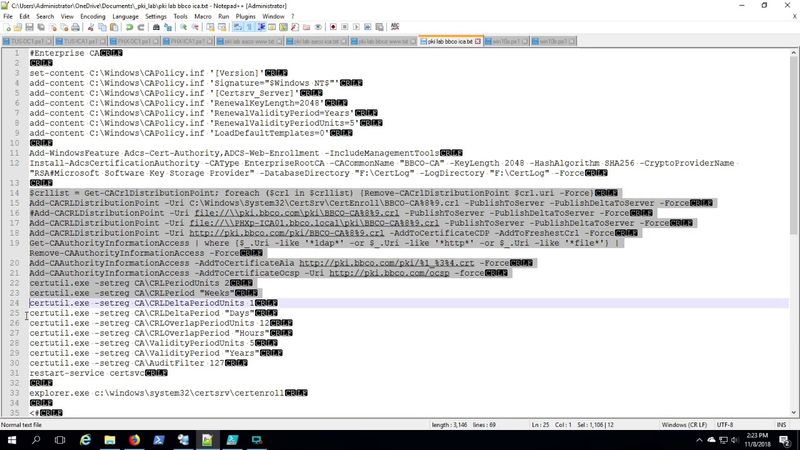
This edition picks up from where the previous lab videos left off. We built base images and customized them. We deployed our lab. We deployed Active Directory. Now we install and configure the Active Directory Certificate Services roles, including a root CA, issuing CA, WWW server to host the CDP (CRL Distribution Point) and OCSP service. Remarkably, it all checks out OK in PKIView.msc at the end. Hey, be sure to subscribe. Comments? Questions? Welcome! Be sure to read these articles that provided the basis of all my work so far. I have had to adjust and refine a few items along the way. But these all were very informative. Cross Forest PKI Series and more! 1) Creating Base Images in Hyper V - Its the Remix!!! 2) Creating Base Windows Images in HyperV 3) Running SYSPREP with an Unattend File 4) Deploying the Lab 5) Configuring Active Directory For the Lab 6) Completing the PKI Environment Setup 7) Starting the Cross Forest PKI Setup 8) Completing the Cross Forest PKI Deployment 9) Cross Forest PKI Auto Enroll The Sequel - Production Hits a Snag 10) Two Tier PKI Lab with CDP and OCSP 11) Using the CERTREQ command to include a SAN 12) Revoke Certificates Using PowerShell with the PSPKI Module
Similar videos: Completing the PKI Environment Setup

I Turned This Broken Phone Into A Home Server

ChatGPT - в прошлом \\ Google прокачает Gemini \\ Antrophic - подвальные гении
The Stunning Xfce Customization and How You Can Do the Same
Обзор DLSS 4.5 — очередной шаг вперёд от NVIDIA?

Ultra Modern Logo Reveal | After Effects Tutorial