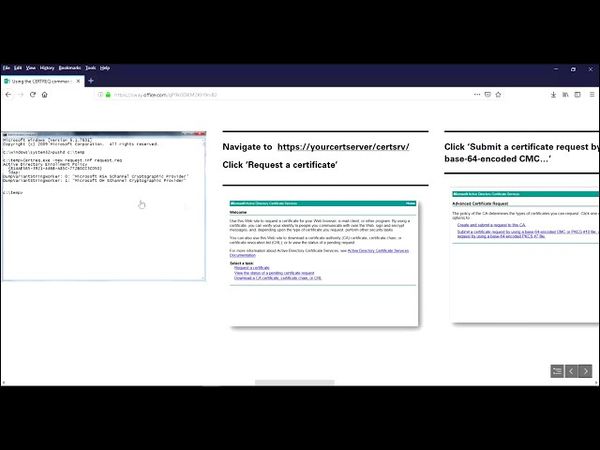
Using the CERTREQ command to include a SAN

Download information and video details for Using the CERTREQ command to include a SAN
Uploader:
ShotokuTechPublished at:
5/5/2019Views:
4.3KDescription:
Here I am using the CERTREQ command to create a request file that will allow me to obtain a certificate with a DNS entry in the Subject Alternative Name field from the Active Directory Certificate Services CertSrv web page. [Version] Signature="$Windows NT$" [NewRequest] Subject = "CN=hostname.domain.com" ; Remove to use an empty Subject name. Exportable = FALSE ; TRUE = Private key is exportable KeyLength = 2048 ; Valid key sizes: 1024, 2048, 4096, 8192, 16384 KeySpec = 1 ; Key Exchange - Required for encryption KeyUsage = 0xA0 ; Digital Signature, Key Encipherment MachineKeySet = True ProviderName = "Microsoft RSA SChannel Cryptographic Provider" RequestType = PKCS10 ; or CMC. [Extensions] 2.5.29.17 = "{text}" _continue_ = "dns=url.domain.com&" [RequestAttributes] CertificateTemplate = MyWebServerCert ; Modify for your environment by using the LDAP common name of the template. ;NOTE: There are four parameters in this file that you need to modify to address your specific needs. ;Subject - This should be expressed as the FQDN of server or URL. EX: "CN=hostname.domain.com" ;Exportable - TRUE or FALSE depending on the requirement. ;_continue_ - This should be expressed as the FQDN of server or URL. EX: _continue_ = "dns=url.domain.com&" ;Additional SANs can be included as needed in this same manner. ;CertificateTemplate = MyWebServerCert, this must match the name of the certificate you select in the pull-down from certsrv References: The Sway: Cross Forest PKI Series and more! 1) Creating Base Images in Hyper V - Its the Remix!!! 2) Creating Base Windows Images in HyperV 3) Running SYSPREP with an Unattend File 4) Deploying the Lab 5) Configuring Active Directory For the Lab 6) Completing the PKI Environment Setup 7) Starting the Cross Forest PKI Setup 8) Completing the Cross Forest PKI Deployment 9) Cross Forest PKI Auto Enroll The Sequel - Production Hits a Snag 10) Two Tier PKI Lab with CDP and OCSP 11) Using the CERTREQ command to include a SAN 12) Revoke Certificates Using PowerShell with the PSPKI Module

Similar videos: Using the CERTREQ command to include a SAN

Creo una Nube para mi Amigo con una PC antigua y con Discos Duros Viejos | OpenMediaVault SERVER
I Made a Personal VPN to Access EVERYTHING… and You Can Too!

Creo una Nube con una PC antigua y con Discos Duros Viejos | OpenMediaVault 7 SERVER
Fix Key Protector Could Not Be Unwrapped | Hyper-V Guide

STRONG and FULLY 3D Printed Arms for your Ender 3 KE and SE